A user on XSS advertised a new MaaS stealer named Storm Stealer. The text of the post is taken “as-is” from the thread on the XSS forum and machine translated from the Russian language by using DeepL service (with some minor corrections from my side).
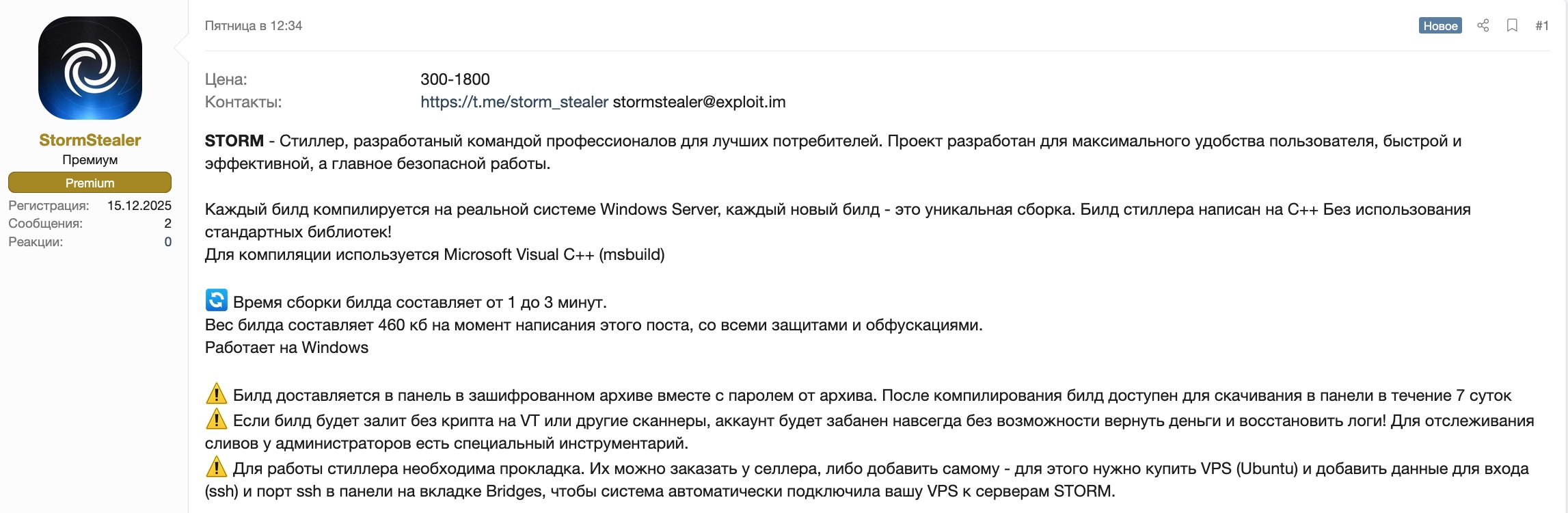
STORM / The best stealer for professionals / Windows / C++
STORM – Stealer, developed by a team of professionals for the best consumers. The project is designed for maximum user convenience, fast and efficient, and most importantly, safe operation.
Each build is compiled on a real Windows Server system, each new build is a unique assembly. The stealer build is written in C++ without using standard libraries!
Microsoft Visual C++ (msbuild) is used for compilation.
🔄 Build time is 1 to 3 minutes.
The build size is 460 KB at the time of writing this post, with all protections and obfuscations.
Works on Windows.
⚠️ The build is delivered to the panel in an encrypted archive along with the archive password. After compilation, the build is available for download in the panel for 7 days.
⚠️ If the build is uploaded without cryptography to VT or other scanners, the account will be permanently banned without the possibility of refunding money and restoring logs! Administrators have special tools to track leaks.
⚠️ A bridge is required for the stiller to work. You can order them from the seller or add them yourself. To do this, you need to purchase a VPS (Ubuntu) and add your login details (ssh) and ssh port in the panel on the Bridges tab so that the system automatically connects your VPS to STORM servers.
Build functionality
Dynamic browser collection
Unlike many stealers that use hard-coded browser lists and constantly require updates when new versions are released, Storm uses intelligent dynamic search: The module automatically detects installed browsers by scanning the system for key markers characteristic of all Chromium- and Gecko-based browsers. The module finds not only standard installations, but also portable versions of browsers, as well as overlay applications that use the Chromium engine. Thanks to this approach, Storm collects virtually any browser without the need to add it to the config.
Server-Side Browser Processing
Unlike all existing stealers on the market, Storm does not make any SQL queries within the system, avoiding the use of sqlite and nss libraries. Instead, Storm exports all browser files as is, and all processing (parsing and decryption) takes place on the server side. The module automatically determines the encryption type, extracts the corresponding master key, and uses it to work with the data. For App-Bound Encryption, it uses its own shellcode, which obtains the key through built-in Windows functions. This allows it to work with the latest browser versions. All types of encryption used by different versions of Chromium browsers are supported: classic DPAPI, AES-GCM (from v80+), and the new App-Bound Encryption (ABE).
⚠️ Important: All decryption is performed on the server. The build only extracts the master key and sends it along with the encrypted data.
Databases are never opened on the victim’s computer, which minimizes suspicious activity and reduces the risk of detection.
Data collected: Browser history, Form autofill, Cookie files (including session cookies), Google account tokens (Chromium-based browsers only), Credit card details, Passwords.
Collecting data from Gecko-based browsers (Server-Side)
Firefox and other Gecko-based browsers use a completely different data storage architecture and encryption system. Storm is fully adapted to these specifics and correctly collects all the necessary files for subsequent password decryption on the server side. The module automatically detects the browser name (Firefox, Waterfox, Pale Moon, and others) and collects all the files necessary for decryption on the server. Collection from all user profiles, including additional profiles, is supported.
Browser extensions for crypto wallets and password managers
A universal module for collecting cryptocurrency wallets and password managers installed as browser extensions. The list of wallets is fully customizable via the control panel — you can add any extension that is not included by default in just a couple of clicks. Changes are applied instantly, without the need to rebuild the build.
Crypto wallet collection
A powerful module for collecting desktop cryptocurrency wallet applications.
Fully customizable via the panel—you can add any wallet by specifying the path to its data directory. Supports environment variable expansion, making the configuration universal for different systems. The module uses a flexible file mask system to filter the collected data — you can specify which files to collect and which to exclude. It is possible to set a file size limit for optimization.
File Grabber
One of Storm’s most flexible and powerful modules. Allows you to collect any files from any system directories according to customizable rules. Each rule contains a search path, file masks to include, masks to exclude, and file size limits. The module supports complex search rules with different levels of nesting. Built-in protection against duplicate collection – the paths of scanned files are cached, which prevents the sending of duplicate files even if the configuration is incorrect. When the grabber is running, nothing is dropped to disk—files are assembled entirely in RAM. All files are compressed before sending to minimize network traffic. When configuring the build, it is recommended to use the default settings.
Messenger collection
Stealer supports the collection of well-known messengers such as Session, Telegram, Pidgin, Signal, etc. The module supports different search modes for collecting not only regular clients, but also modded clients. The advantage of Storm is that it will find any messenger installed on the system, not just those in the standard location. The module also supports the collection of all messengers installed on the system, not just one. For example, it will collect Telegram + AyuGram (or other modified clients).
Discord tokens
Discord stores access tokens in various locations: browser Local Storage, IndexedDB, and other storage locations. Storm searches for tokens in all possible sources, ensuring maximum coverage. The module scans browser profile directories and the Discord application, extracting tokens from all sources found.
Types of Discord tokens collected:
- Basic tokens
- MFA tokens
- Encrypted tokens
Screen capture
The module captures the current state of the desktop in high quality.
It uses an optimized GDI API to create a screenshot, supports multi-display configurations (captures all connected monitors), and saves the image in JPEG format with optimal compression to minimize file size without losing quality. The image is created entirely in memory and sent to the server without being saved to disk, which eliminates artefacts on the file system.
System Information
The module collects detailed information about the system to create a complete machine profile. All data is collected in memory and sent to the server without being saved to disk.
Data collected:
- OS version
- Processor architecture
- Processor information (number of cores|number of threads)
- RAM size (in megabytes)
- Display information
- GPU information
- Network interface (IP address, interface name, MAC address, gateway, interface type)
- Launch mode information (Launch Mode: Disk/Memory, file path if launched from disk)
All data is sent to the server to create a system profile and is also processed on the server (Server-Side Processing).
Loader
A functional non-resident loader for loading and executing additional files. The loader configuration is fully customizable via the panel and can contain up to 10 files for loading.
Each file has a URL for loading, a path for saving to disk, and a file type (exe, dll, ps1). The module saves files to disk using NtAPI and executes them. For .exe files, CreateProcessW is used with the CREATE_NO_WINDOW flag for hidden execution.
For .dll files, LoadLibraryW is used for standard library loading. For .ps1 files, PowerShell is used with the -exec bypass parameter to bypass script execution policies. The module supports environment variable expansion in paths (e.g., %TEMP%, %APPDATA%) and automatic directory creation when necessary. All files are saved to disk before execution.
Admin panel functionality:
Screenshot: https[://]ibb[.]co/0yDtvQ8K
Build control panel for adding build space, creating and configuring builds.
Here you can configure the grabber, loader, and enable/disable Discord, Session, Signal, Telegram, etc. collection…
Screenshots: https[://]ibb[.]co/d02k1pbj, https[://]ibb[.]co/WWG84VsM
Control panel for adding bookmarks. You can add a bookmark yourself or order it from the seller.
Screenshots: https[://]ibb[.]co/JjPD4kP2у
Domain Detect for log tags. You can add your list of links by pasting a ready-made list; links should be separated by commas or indented to a new line.
Screenshots: https[://]ibb[.]co/gZmVPjGv, https[://]ibb[.]co/ZR68wv3q, https[://]ibb[.]co/nszSJkBS
Cookie Restore for restoring active Google cookies and Access Tokens using Google Refresh tokens. To access your Google account, you must use the same SOCKS5 proxy that was used for restoration.
Screenshot: https[://]ibb[.]co/bTp0cDN, https[://]ibb[.]co/v4xG69tR
Team Functionality for creating accounts for workers and setting access rights. You can specify who can download logs, who can download builds, etc.
⚠️ If any of the workers leaks the build to VT or other scanners, the entire account with the license will be banned without refund and without the possibility of restoring the logs!
Screenshot: https[://]ibb[.]co/zVws6dkS
⚠️ API for commands is not yet implemented
⚠️ Crypt is required, the build will not work in its pure form!
⚠️ At the end of the subscription, all logs remain in the panel and will be available after renewing the tariff, but the builds will continue to work even after the license expires. (If you forget to renew your license, the leak will remain, but the logs can only be downloaded after renewing the license – except in cases where the client did not have time to download the logs due to the fault of the service)
⚠️ For leaking to VT and similar services, you will be banned forever!
⚠️ The product does not work in RU/CIS!
Rates and prices:
| Duration | Price | Description | Name |
| 7 days | 300 USD | One-week demo version (Does not include technical support, only Q&A) | Demo |
| 30 days | 900 USD | Standard 1-month license (Includes standard technical support – assistance at all times) | Standard |
| 30 days | 1800 USD | The Team license for teams includes 100 seats for teams and 200 seats for builds. | Team |